
I Built a Node Editor UI System using Raylib instead of Unity UI
And you should too!

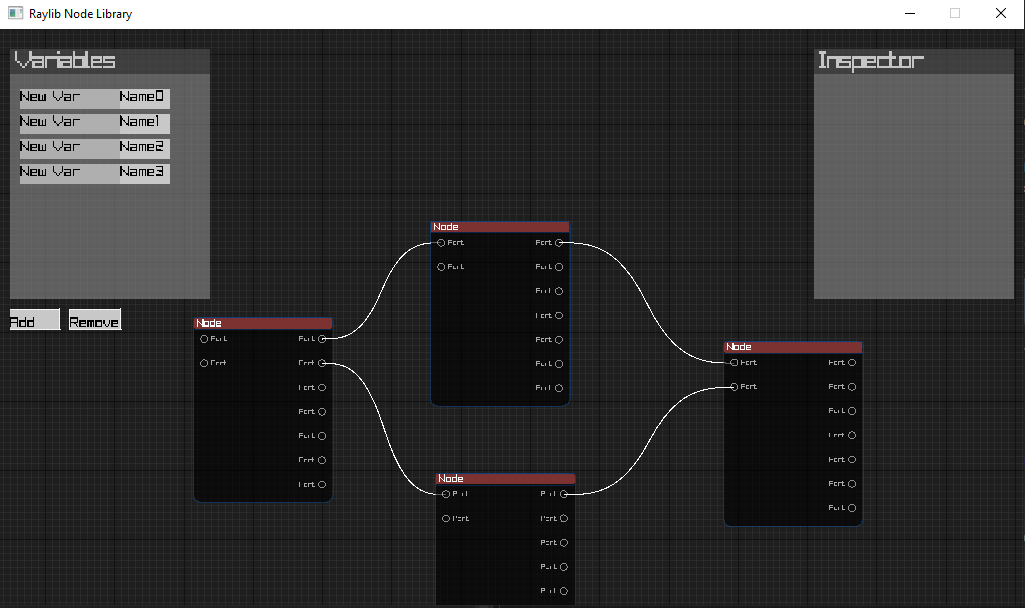
While working on our current game project Eternal Deviations: 1350, we came across the need to build a Node Editor Tool.
We had some options:
Use Unity UGUI, the default unity UI package which uses game objects.
Use Unity’s new Graph Toolkit which is a package specifically for creating Graph based tools.
Use Unity’s old but relatively mature GraphView API for the same purpose.
Use Unity’s UIToolkit instead of UGUI.
Build a custom solution (including external libraries and frameworks).
So many options! However, most of them are very inconvenient.
Well, the least inconvenient option was to use UGUI, but it is not exactly made for creating a graph tool. Though, an advantage to creating the tool in UGUI was that we could run the tool at runtime. That wasn’t a requirement though.
Unity’s new Graph Toolkit (GTK) was quite promising! At least on surface. It even had some documentation. I downloaded the Unity 6000.4 version which was tagged ‘supported’ and started a new graph tool project using it. Good thing that in Unity 6.4, the GTK has become a default part of the Engine (no external packages needed). The project started coming to fruition soon; as I was using a node library which basically does all the heavy lifting, it was feeling like a breeze. But! It was not meant to be. We soon realized that GTK is quite early in development. The library is good for creating ‘traditional’ graph tools, but as soon as you try adding events or try to customize it just a little bit, you are out of luck. GTK becomes only a bit more customizable in later versions of the engine and those versions are beta and alpha versions of the Unity Engine at the time of developing this tool.
Ok. Back to the drawing board. What should we do now? I considered going back to UGUI (like a ‘good boy’ Unity dev) or maybe using UIToolkit: which is better in some ways but incredibly tedious when compared to UGUI.
Wait, didn’t Unity have an older Node Graph Library? Ah yes, the GraphView API. Maybe that was it? Yes, people say that the library is soon going to be deprecated as GTK would replace it, but in another sense, the library is also quite mature! I started a tutorial video on GraphView API (naturally it was 2 odd hours long), to get a feel for it. I was some minutes into the tutorial, and the guy had created a fairly impressive Editor tool using it, but then he said the word. “Boilerplate”. There’s a lot of boilerplate code involved to do even simple things. I immediately NOPed out of the video. In hindsight, maybe I was a bit hasty, but…you can’t have everything. Hearing that there is boilerplate involved made the silver lining of the GraphView library being mature turn into the pain point that the library would soon be up for deprecation! Also, it would have taken time for me to go through all the documentation and tutorials.
Again, back to the drawing board. I looked at UGUI, the classic, the jewel among stones. The easiest UI library to grace this earth…(IMGUI? what’s that?). Though I still had the option of using UIToolkit. It is, after all, the modern alternative of UGUI. However, the allure of UGUI superseded the retained mode, optimized data binding and rendering, and integrated CSS styling features of UIToolkit!
I looked at UGUI, a constant companion and chose it!
Wait…no that’s not what happened.

While I had the option of using another external UI ‘library or toolkit’, the game project’s development environment was Unity (dotnet), so I heavily preferred to remain in C# land. There were UI libraries in C# too, but I didn’t like Avalonia or MAUI too much (mostly because I don’t use them regularly).
I do like to use Raylib though. Even if it is quite low level and not necessarily a UI library, I had also created a simple and useful layout engine for Raylib. The thing is, Raylib is a single header C library. That makes it ultimately portable. So, I used Raylib-cs, the C# bindings of Raylib. The subsequent article should be read keeping in mind that I had already committed to use Raylib as the foundation, even if it meant fighting tooth and nail for compatibility up the stack.
Now, we just needed an actual (predeveloped) UI library which could work on top of Raylib, which also had bindings for C# (this is not a small ask). Unfortunately, Raylib’s own raygui is available, but it doesn’t have an updated C# bindings package (it targets an older raylib version). However,
IMGUI was available; in C# it is the IMGUI.NET package. Next, there is a repo called rlIMGUI which bridges Raylib and IMGUI, and it also had C# bindings called rlIMGUI-cs! Basically, rlIMGUI uses Raylib as the renderer for the IMGUI draw calls. Yes, that’s it! IMGUI even had node libraries built on top of it, like imnodes and imgui-node-editor (among others).
Happily, I started looking at node libraries built on top of IMGUI, which also had C# bindings.
That’s when the issues started.
Remember those node libraries based on IMGUI, which also had C# bindings? These node library C# bindings were not built against the IMGUI.NET package which I wanted to use. Instead, they had developed their own alternative IMGUI dotnet bindings in addition to the node library bindings themselves! The libraries were built against various different (who knows which) versions of IMGUI. I refused to yield. I wanted to use the standard dotnet release of IMGUI which was IMGUI.NET. It is relatively popular and frequently updated and reasonably battle tested, unlike those alternative versions with opaque release schedules and unknown quality.
I pinpointed this stack:
Raylib as the base renderer. (C# Bindings: Raylib-cs)
IMGUI as the UI library (C# Bindings: IMGUI.NET)
rlIMGUI as the bridge b/w Raylib and IMGUI (C# Bindings: rlIMGUI-cs)
imnodes which is a node graph library built on top of IMGUI (C# Bindings: HEXA.NET or Evergine)
There was a teeny bit of problem in this stack.
First the good news: Raylib-cs had no other dependencies. IMGUI.NET had some System.* dependencies which was not an issue. Lastly, rlIMGUI-cs had two dependencies, which were Raylib-cs and IMGUI.NET themselves (the newest versions of those libs even). So, all’s good!
The issue was imnodes. It had two available dotnet bindings. by Hexa and Evergine. Both of these bindings were built against custom IMGUI C# bindings instead of IMGUI.NET. Consequently, they had dependencies: Hexa.NET.ImGui and Evergine.Bindings.Imgui instead of IMGUI.NET. But I wanted imnodes C# bindings which were built against IMGUI.NET package…not custom packages! There are multiple reasons (like quality and ‘unofficial’ builds), but even more importantly, rlIMGUI also used IMGUI.NET and not the Hexa or Evergene Imgui libs, naturally.
And so, started my fruitless journey of trying to make this work in a couple of days.
Here are some embarrassing details:
I thought about generating C# bindings for imnodes myself. As imnodes (and imgui) have been developed in the great C++, to generate bindings for them, c-wrappers have to be created to bypass Cpp’s name mangling (and other things). The good thing was that c-wrappers for both imgui and imnodes were available (cimgui and cimnodes). The issue was, I wanted to make those new bindings depend on the preexisting IMGUI.NET package which has already been built instead of building a new alternative IMGUI.NET package to depend on.
As I thought about this, I understood why Hexa and Evergine created their own custom IMGUI bindings. IMGUI.NET devs don’t provide other relevant imgui dependant package dotnet bindings (like imnodes). That was quite the issue.
Naturally, to make my own imnodes bindings depend on the (already built) IMGUI.Net bindings I needed to do some shenanigans. Specifically, I needed to find the cimgui.dll, (the built c wrapper of imgui), which came with the IMGUI.NET package. Then I needed to find its version. Then I needed to find the same cimnodes version. Then I needed to build cimnodes (dependant on imgui, imnodes, cimgui). Throughout this, I had to ensure the Application Binary Interface (ABI) of the prebuilt cimgui.dll perfectly matched the new imnodes bindings I was compiling. Furthermore, the newly built cimnodes couldn’t statically include ImGui; it had to dynamically link against the existing cimgui.dll…(which is prebuilt).
I really tried too…(why?)
I created a cimgui.lib (to link against) from the existing cimgui.dll by exporting all the definitions using dumpbin, then used a script to automatically clean up that txt file. Lastly, I generated the .lib file using the command lib /def:cimgui.def /out:cimgui.lib /machine:x64.
So, after all this, I found out that the cimnodes’ default build pipeline included CMAKE. That is where I draw the line.
So, I removed imnodes from the stack. Sweet relief. Best decision. Ensuring ABI compatibility, with the final boss being CMAKE was fitting, and so was bypassing that specific issue.
Anyways, here we have the updated stack:
Raylib as the base renderer. (C# Bindings: Raylib-cs)
IMGUI as the UI library (C# Bindings: IMGUI.NET)
rlIMGUI as the bridge b/w Raylib and IMGUI (C# Bindings: rlIMGUI-cs)
What about the node library, you ask? Well, we can easily make one or two node libraries, no sweat. At least it is better than Cpp dependency hell.
So, I started work on the Node Editor.
Then another problem struck. Remember how I said that I didn’t use ImGui much? I realized that everything is actually a window in ImGui. WHAT?
Here is our updated stack:
Raylib as the base renderer. (C# Bindings: Raylib-cs)
So simple, so easy!
So, I started work on the Node Editor.
The first thing I worked on was…the Graph background! I wanted something on the screen, and what better than something that makes it immediately recognisable as a node editor?
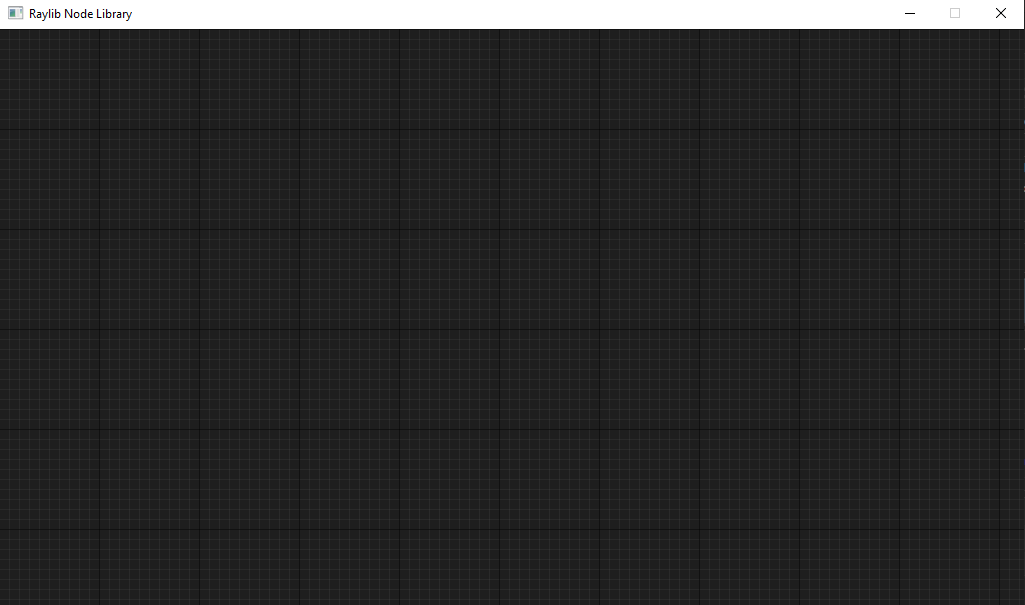
Turns out, creating an optimised graph view is not a simple thing.
Deciding to optimize it later, I started work on the framework which this library would have.
The main file (Raylib window Init and loop), subsequently evolved into the ‘Engine’ class and the ‘Drawable’ became the base class for all stuff which could be drawn on the screen. A drawable has an optional parent and positions (relative and absolute positions, which was calculated using the relative and parent positions). The Render related functions are the ‘main’ features of this class.
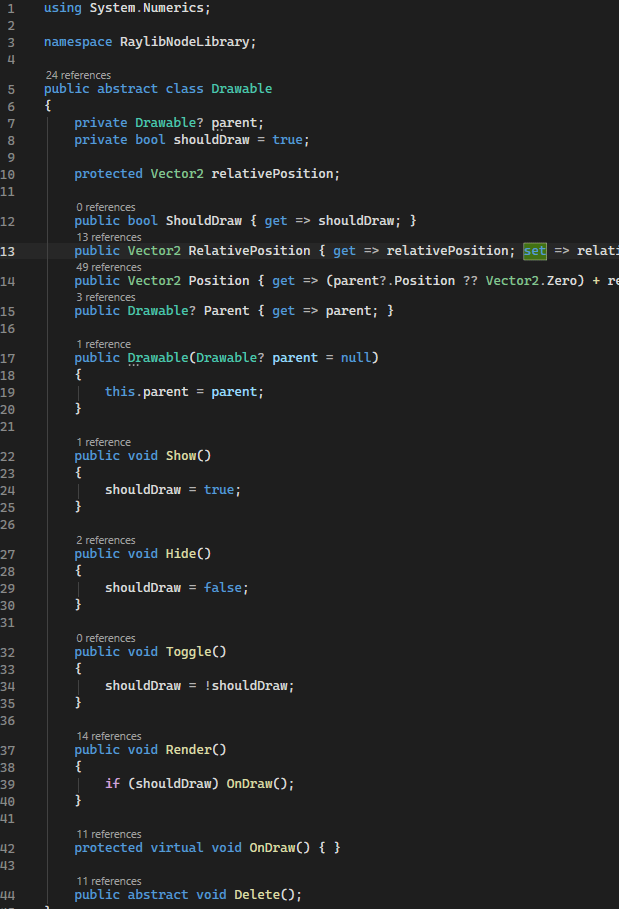
I thought about creating a composition-based Object and Component system similar to Unity but decided against it for simplicity. This software was going to be an internal tool, so it worked out.
The Drawable had a child, ‘EditorObject’ which handled (mouse and kb) interactions and lifecycle functions (like Update and Delete).
There was another inheritance layer after EditorObject: Actor and UIBase. These were for world objects and UI Elements respectively. Again, a better architecture would have been composition instead of inheritance, as is the case with Unity and other engines.
In any case, the Engine class handled which objects were drawn first (actors, then ui elements).
There are various ui elements which were developed for the tool, like button, selector, input field, etc.
Then there was the UILayout class which was a child of the UIBase.
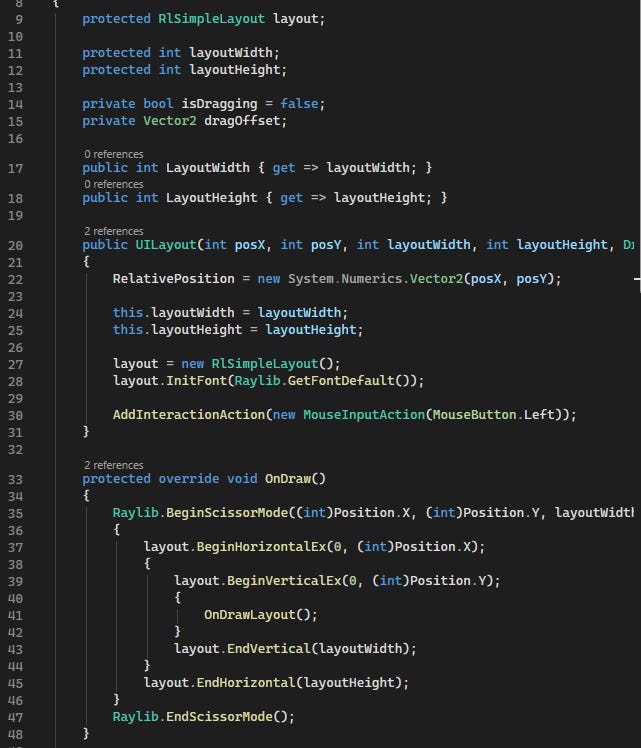
As you can see, the UILayout uses the OnDraw function to create a Raylib scissor mode so the drawing only happens inside the layout. You can also notice the ‘RlSimpleLayout layout’ object, which is an object of the layout engine. It manages all the layout operations: The class handles caching of UI Objects if needed, laying out UI in nested horizontal/vertical blocks according to provided parameters (or automatically if none provided), and provides options to notify it if we need to draw something custom, so that it can adjust its internal positions accordingly.
By the way, the brackets after BeginVertical/BeginHorizontal are just a personal preference. They are not needed.
This is not the complete class though. As you can see, the OnDraw function itself calls OnDrawLayout which is an abstract function. The children of the UILayout class can use this to create custom layouts.
Demo of the UILayout system (both code and screenshot):
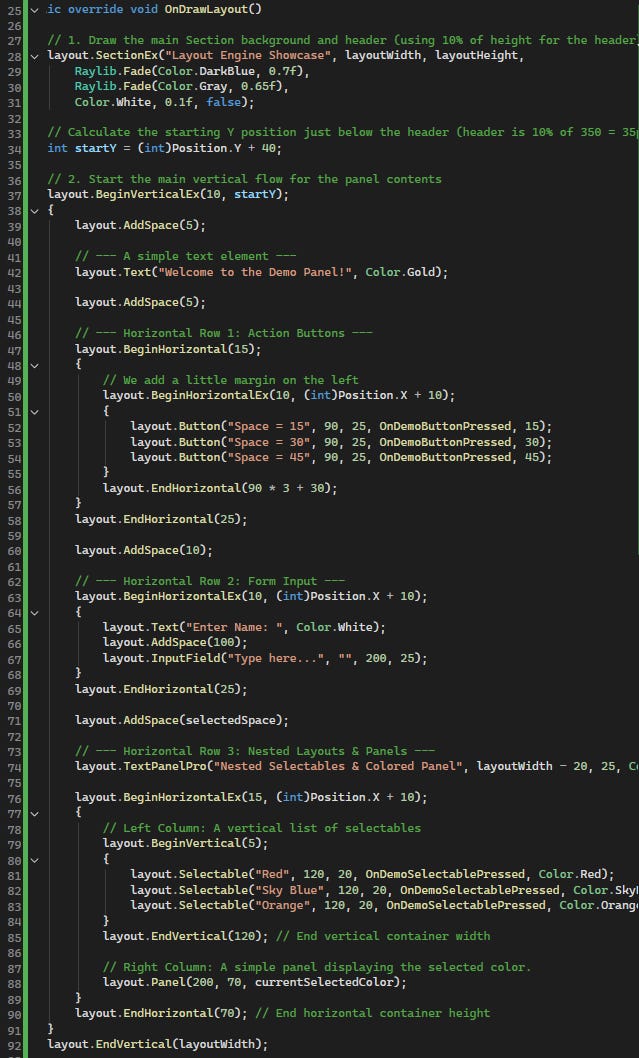
This code generates a demo layout. The layout has a section which adds a header and background. It has headings, then three buttons which control UI spacing and then an input field. Lastly it also has three selectables and a colored panel whose color is according to what is selected.
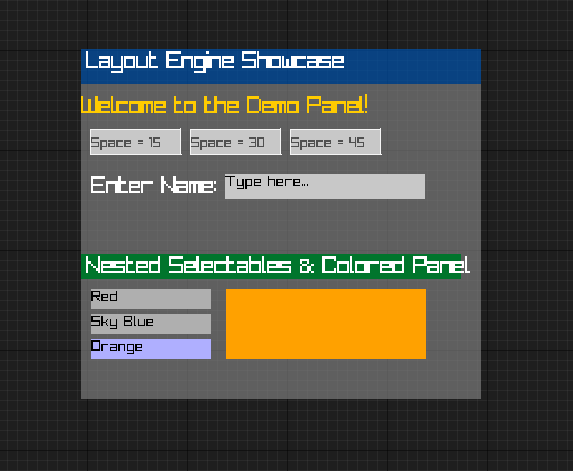
[Note that I have used Raylib’s default font, which is a bit…blocky]
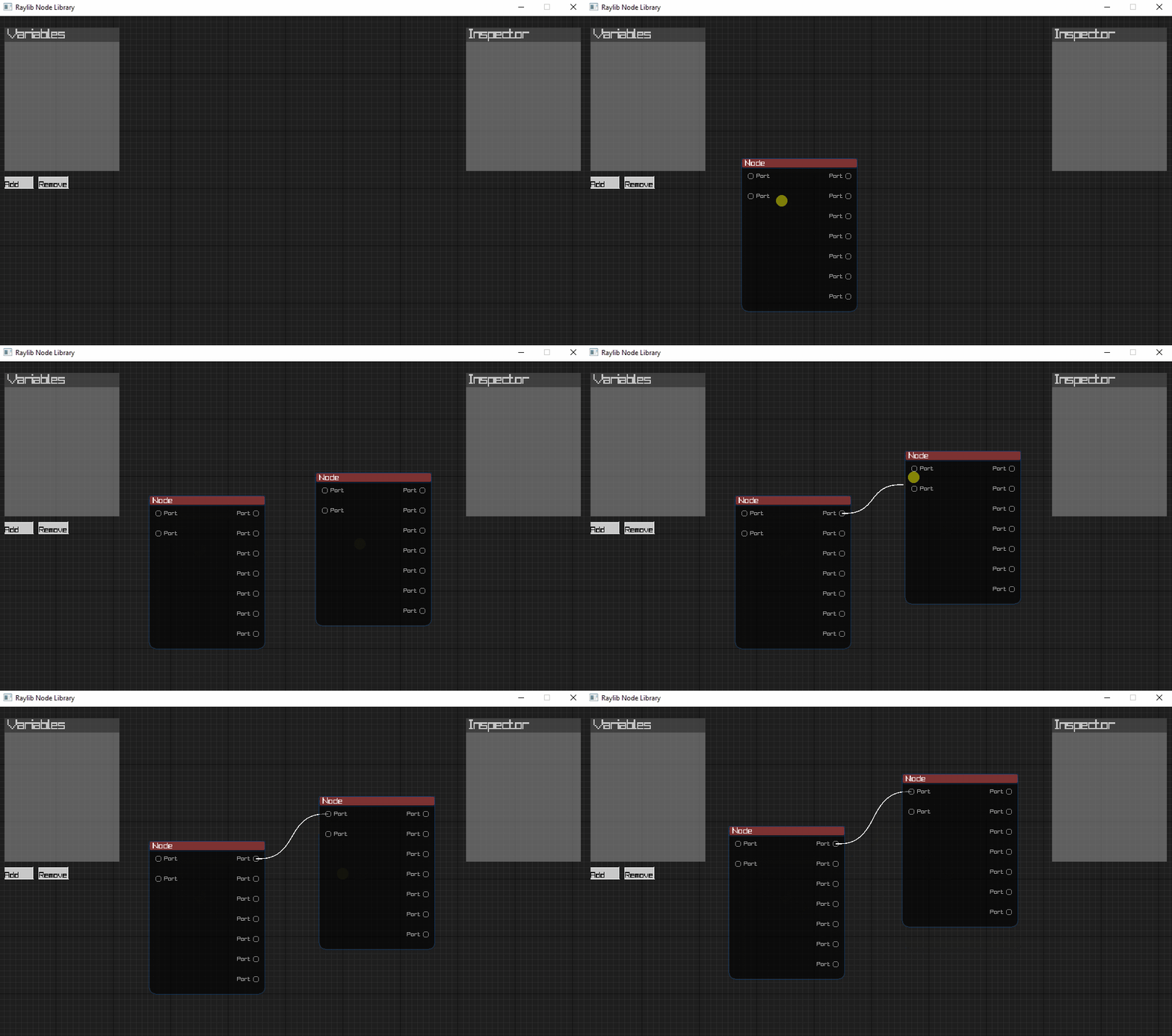
The node system also came along well, including customizing a node with ports and connecting wires between valid ports. The wires’ display (usually difficult because of edge rendering) was simple to implement, as raylib provides functions to draw Bezier curves and splines. The wires could be dragged from ports. If a dragged wire was dropped onto a valid port, it could form a connection.
In addition, using the layout system, the variable (blackboard) and inspector panels were also developed.
All the interactions (like clicking, dragging, etc) were possible through the InteractionManager, which was a real mess. Oops. This was mainly due to the way I had reasoned about Input and how I had implemented it. I always knew that the input system would be a tough nut to crack, but I still foolishly chose the quick and dirty way…
The issue was that I was doing too many things in that class; but in spite of that the various interaction states were still scattered throughout different places.
For example, the EditorObject handled the translations of generic interactions to specific devices (like mouse, kb). The objects could subscribe to interactions, but the way they did that was through direct input subscription (like Mouse, LMB), instead of subscribing to a state like Dragging, or Selection.
The InteractionManager did everything from Target Resolution, Hit Testing, Interaction Session Storage, and whatnot. In addition, it managed hover states separately from other input states.
While the interactions were ongoing, the interactors/interaction session didn’t capture the devices (like mouse LMB), so multiple interactions using the same input stream could be started.
The subscribers could have interaction priority, and they had the ability to block other interactors when their interactions were ongoing, so somehow the system still worked. But, because the complexity of the Tool is increasing, it has become necessary to refactor the InteractionManager, which I am in the process of doing now.
The tool has a separate Data Layer which stores the actual data of the graph. Currently, the data layer is directly coupled with the UI layer, instead of events or data binding, as that is the most straightforward (and quick) way for this internal tool.
In short, the architecture now has a central engine loop with separate actor and UI lists, a camera, a graph model, a simple UI library, and custom setup/update/render phases. That is already more like a small engine than a simple editor utility.
People do not create UI Libraries for fun. Okay, maybe they do…let me rephrase.
People do not create UI Libraries for fun during production. If they are still doing it, there could be profound reasons for that decision. Or they may just be unhinged…
Are you the former or the latter?