
Refactoring a messy Input System is NOT fun (ʘ‿ʘ)
Refactoring the Input System of my Raylib Node Library.

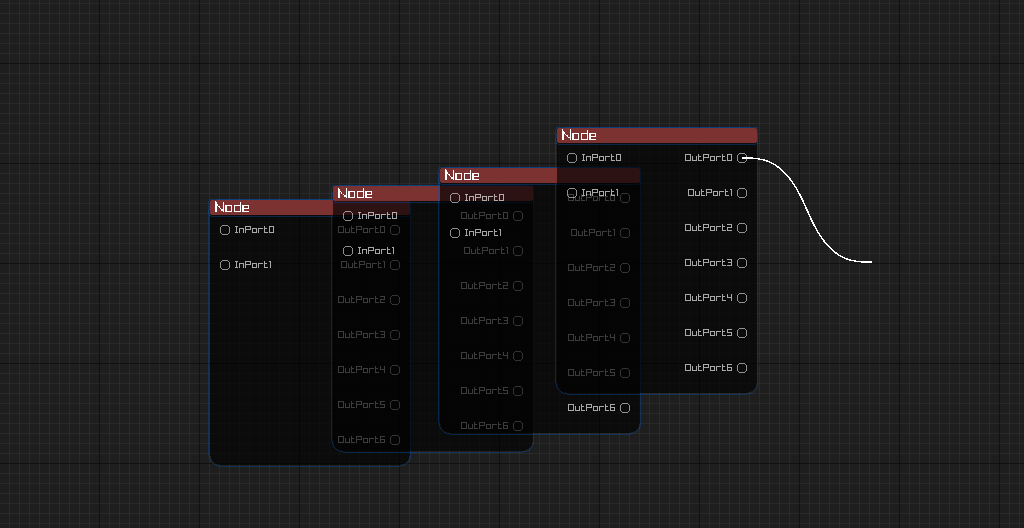
The Input System of my Raylib Node Library needed refactoring. Why do I have a Raylib Node library? For our game’s development we needed a Node Library: and we ditched Unity and chose Raylib to create the library from scratch. Read more.
Anyway, I was crazy enough to try and create a whole UI library from scratch in a couple of weeks; hence, we find ourselves in the current situation. Good thing I was using Raylib, at least, so the rendering was trivial.
However, using Raylib didn’t spare me from creating an Input System for said UI library.
Why it was a mess
The way I had (hackily) architected the old Input/Interaction System was:
All the Interactables were in a single flat list (no hierarchy!) stored in the Interaction Manager. As there wasn’t a set hierarchy, some things didn’t work: for example, no input bubbling to parent.
Each interactable had a priority, and the ability to request “BlockOtherInputs”.
Interactions could be started for multiple interactables on the same input stream.
Each interactable had to manually subscribe to the Input System, while also declaring what raw interactions it wanted to subscribe to. For eg.: if it wanted to subscribe to a left click, it had to declare the mouse’s left button while subscribing. Another eg.: if it wanted keyboard Input, it would subscribe to ALL the keys one by one. So, if an interactable subscribes to keyboard inputs from a-z, that right there is 26 subscriptions.
In ‘normal’ UI libraries, there are different interfaces for different inputs. For example, IPointerDown, IScrollable, IDoubleClick, etc. (This is just an example of a ‘normal’ UI Library). However, in my old input system everything happened through ONE mega interface called IInteractable. The base class (EditorObject) implemented that interface and sent/called abstract functions like OnMouseDown, OnMouseUp, etc. which children could override. Honestly, I actually liked the fact that classes didn’t need to implement TEN interfaces to get different functionalities, but still it was messy.
So now that we have a gist of the old architecture, let’s move on to the problems. The problems that arose due to this sublime implementation were numerous.
Here are some:
Suppose a left mouse click happened…the system would pick the list of all the interactables, and one by one check which interactable was subscribing to the mouse, specifically the LEFT mouse button. After congregating those relevant objects, it then sorted them by priority. Now that it had gathered all these potential interactables, an interaction session would start for ALL of them! Suppose we had a panel, and a selectable inside that panel…the interaction system would send the click to both the selectable and its parent panel. Consequently, we could click the selectable, and at the same time, drag its parent panel too! However, to fix this issue, there was a functionality to “BlockOtherInputs”, so an activated interactable could request to block subsequent inputs…But! if a non-blocking interactable had a higher priority, that would always run first, and the “BlockOtherInputs” request of later activated interactables would have already failed because of lower priority. Funny how a single architectural decision can spiral.
As the interactable objects had to subscribe to each raw input that they wanted, an interactable subscribing to keyboard input (like an input field) usually had a long list of subscriptions.
Suppose a button was inside a panel…and the button was deactivated and the user clicked this button…normally (in sane UI Libraries) what would happen is that the click would be received by the button, but the button wouldn’t consume the input as it is deactivated. Instead, the input would ‘bubble’ to the parent. See how the hierarchy is important? Now suppose, even the panel doesn’t want the click input…then the click would keep bubbling till it reaches the root. This wasn’t possible in the old input system…at least the way I had implemented it.
So many issues! And the architecture was quite problematic too. How would we refactor this?
So, you might be starting to realise, dear reader, that this “refactor” is actually…a rewrite!
The Rewrite
The first order of business was to make the ‘subscription’ go away. Usually, in mature UI library input systems, whenever there is a subscription, it is for “Input Actions” (for example Jump input action). Then the user could bind this ‘Jump’ to the ‘Space’ key raw keyboard input. This is to decouple the input action from the raw input which helps in multiple things including rebinding keys.
But, for our UI Library, we didn’t really need rebinding functionality. The old subscription system was a pseudo InputAction system: it actually used raw inputs directly, not even providing rebinding functionality. So why was it even there? DELETE.
Next was introducing the hierarchy. Now, you might remember from the previous post, there was already a hierarchy present in the Drawable/EditorObject class. It had an optional parent. So now, we just needed to USE that hierarchy for the input system!
Introducing: Hit detection. I created a HitTest function in EditorObject.
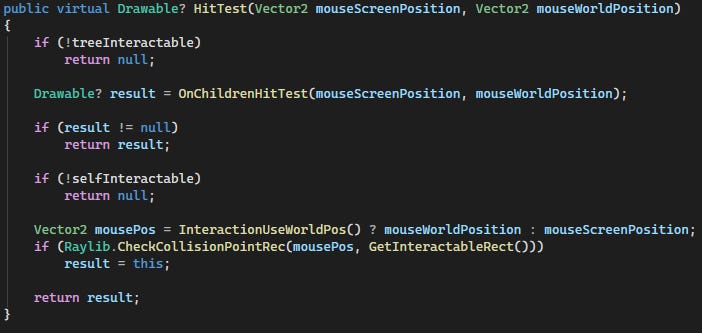
[This image is of the HitTest(Vector2, Vector2) function inside the EditorObject class]
This function uses Raylib’s CheckCollisionPointRec to see if a mouse position fits inside a 2D rectangle (axis aligned). It doesn’t really fire a raycast, but I still named it ‘hit test’. The function prioritises any children which were hit. If no child was hit, it returns the result of self-hit test (be it hit or null). The treeInteractable boolean controls whether to deactivate the whole tree (self and children) and similarly, the selfInteractable boolean is self-explanatory!
Any child classes of EditorObject can override the OnChildrenHitTest, to return the result of their own children. Thus, the hierarchy is formed.
Now, to use these hit tests, I added the FindDeepestHitObject function to the InteractionManager.
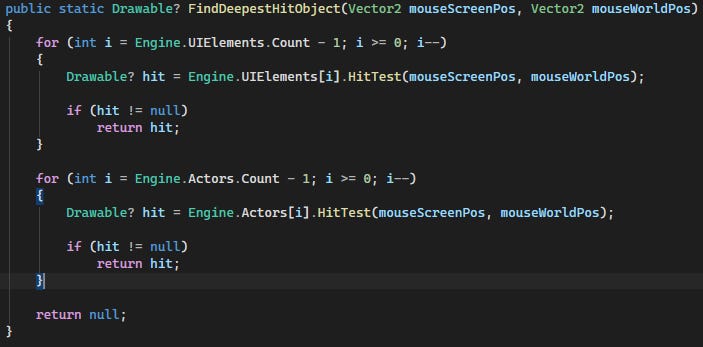
[This image is of the FindDeepestHitObject(Vector2, Vector2) function.]
The FindDeepestHitObject function checks the UI Elements first, and then it checks the Actors (world objects). There are two ‘layers’ as a result. As you can see, the loops are running in the reverse direction to make sure objects which are on top (Z-level) are tested first.
This function starts the process of Hit Testing on ‘root’ objects (objects directly stored in the Engine.UIElements or Engine.Actors lists). Then those root objects would test their own children. Doing this, the deepest object would be returned.
In a more complex UI library, the ‘FindDeepestHitObject’ could have returned multiple valid objects (like a stack of objects according to how they were found during hit testing). If a full tree rejected/didn’t consume the input, the input could be ‘tunneled’ to siblings. However, I found that my current “naive” implementation was enough for now. Usually, it would not be enough, but I have implemented a global fallback for the various inputs (routed to the Engine itself) which then handles global inputs.
Now that we had our hierarchy of objects and a way to test them, it was time to use the result of those tests to refactor the InteractionManager.
The changes were many. Previously, the InteractionManager was using the GetPotentialInteractionTargets function. This was the function which was choosing potential targets according to the current input from the flat list we talked about before. Naturally, now the ‘gathering’ of potential targets would shift from the old function to the newly created FindDeepestHitObject function.
Next, I created the DispatchPointer function. Whenever a pointer input was ready to be sent, this function was responsible for either sending it, or bubbling the input, if not consumed. Lastly, if it found no takers, it sent the input to the Engine as a global input. The keyboard also had a similar dispatcher.
Drag vs Click
Then came the next problem. The classic Drag vs Click problem.
Let’s take a detour and analyze a drag and click.
Situation: Suppose we have a camera which we can Pan using the right mouse button; and the right mouse button (RMB) also opens the context menu.
Now, a click entails: RMBDown → RMBUp. Similarly, a drag: RMBDown → Move/Drag → RMBUp.
As you can see, the first RMBDown is the same for both! So, we can’t tell whether the user will drag or move the mouse. We need to wait for the second step. If the second step is Move, then it would be a drag. If the second step is RMBUp, then it would be a click.
To implement this functionality, we would need to wait till the second step to understand what the user actually wanted. That is, we need a sort of waiting room approach/defer approach.
Of course, this ‘ambiguous’ input can happen for other buttons/keys too. Not just the right mouse button.
Lastly, we cannot send the RMBDown event as soon as it arrives. Why? Suppose we send this RMBDown to the camera, thinking it was a drag. But actually, it was a click. Then we send the RMBUp to the context menu. That could lead to state corruption.
So, we need to wait till we completely know if it is a click or drag, and only then send the RMBDown. After RMBDown, if it is a click, we immediately send RMBUp, and if it is a drag, we immediately send Move/Drag instead.
Double Click
Then, the next issue is the double click. Let’s say we set 300 ms as the double click time. Meaning, if we receive the same button on the same object within 300 ms, we will consider that a double click! Else, we consider that a normal click.
If a user clicks the first time, we cannot wait 300 ms every time to see if it’s a double click or not! Otherwise, each single click would have a 300 ms delay. Meaning, the waiting approach would not work in this case.
Instead, we just decouple a single and double click. The first time the user clicks, we just consider that a single click and send the event normally (after waiting for click or drag of course). If we then receive the same button on the same object within 300 ms, we just send another event, which is the ‘DoubleClick’ event. The handling objects would just have to implement the double click interface too.
Pointer Holder/Capture
Then, we can also add a functionality for different objects to ‘capture’ a pointer. Why do we need this? Suppose we have a slider. We LMBDown the slider handle of the slider, and then we take the mouse (while sliding) outside. Then we LMBUp outside the slider. With our current approach, the slider would not receive the LMBUp…instead whatever is under the mouse at the time would receive LMBUp…hence we would keep on sliding.
To fix this, we can add the pointer capture functionality. Whenever an interactable wants to capture a pointer, it can do so. And the subsequent inputs would only be sent to this pointer holder which has captured the pointer. When LMBUp happens, that would also be sent to this pointer holder, and on LMBUp, it would relinquish control of the pointer.
Keyboard Focus
Let’s give some love to the keyboard too! The keyboard is a different kind of input device than the mouse. It doesn’t have a world/screen position. Consequently, it doesn’t hover over objects. The keyboard input is handled using the concept of focusing! When an object is selected (either by the mouse or the keyboard itself), it becomes ‘focused’ and can then receive inputs from the keyboard. Even if the mouse later moves on, if the focused object remains focused, then it can still keep receiving keyboard inputs.
Whew. That was a lot!
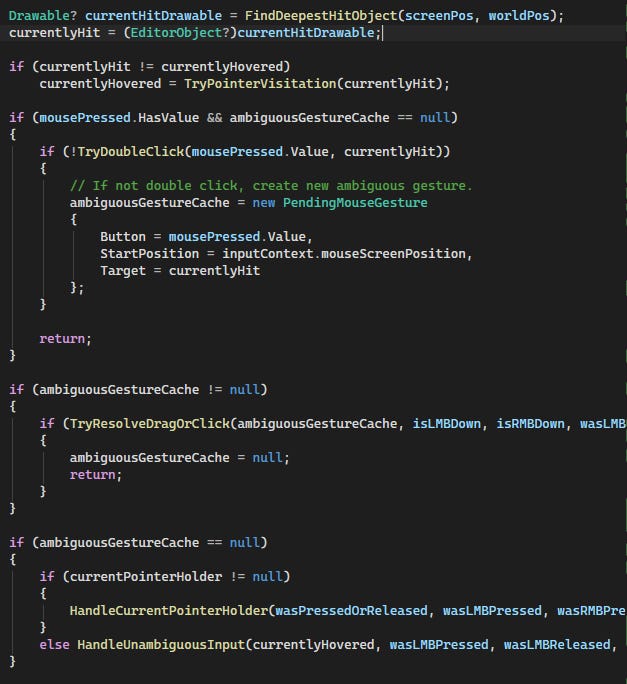
[This image is an excerpt from HandleInput(void) and shows the general flow of input logic.]
A note on refactoring the InteractionManager: In the previous article, I also stated that we could separate the various input phases like: TargetResolution/HitTesting, InteractionSessionStorage, etc.; however, after the rewrite, I realised that the system is not so complex that we would need to separate those steps. Hence, we would keep it in a single file: the InteractionManager :D
And that’s a wrap!
If you liked this article, consider pressing the heart icon, or restacking the article so others may find it!
Thanks for reading :)